
Are you getting things done or just figuring out what to do?

Tasks in one app. Notes in another. Projects in Excel. Deadlines in your calendar. Ideas in saved messages.
Every morning, it's the same story: you search for what you were supposed to do, figure out where you left off, and lose half an hour before you even get started.
And when you finally get to work, the same thought keeps coming back: "Am I forgetting something?"
The problem isn’t your discipline. It’s your system.
Or rather, the lack of one.
You’ve tried task apps, productivity templates, methods with Japanese names, and an empty Notion workspace staring back at you. Nothing works because every tool only solves one piece of the puzzle. And you spend more time switching between apps than actually working.
The first productivity template entirely in Italian!
One place. Everything under control.
Campo Base is a complete Notion system for managing work and life without ever leaving the same page. It’s not a blank template for you to fill in.
It’s a system built around 10 productivity methods tested over decades:
Eisenhower Matrix
to prioritize tasks by urgency and importance
Structured journal
daily, weekly, and monthly reviews
Bottleneck Analysis
to find and fix what’s slowing you down
Energy-based planning
to distinguish deep work, quick tasks, and routines
80/20 Rule
to identify what really moves the needle
Time tracking
to see where your hours go
What’s included
14 integrated databases
Tasks, projects, life contexts, notes, information archive, topics, ideal week, recurring work, bottlenecks, finances, clients, opportunities.
Everything connected. Add a task to a project and it automatically appears wherever it’s needed.
+12 specialized dashboards
- Journal with templates for weekly and monthly reviews
- Routine tracker for daily habits
- Strategic projects to see what moved the needle
- Bottlenecks to get stalled projects moving again
- Work hours to see where your time goes
- Stress to eliminate to clear your head at the end of the day
- AI Instructions Hub to use Notion AI in a structured way
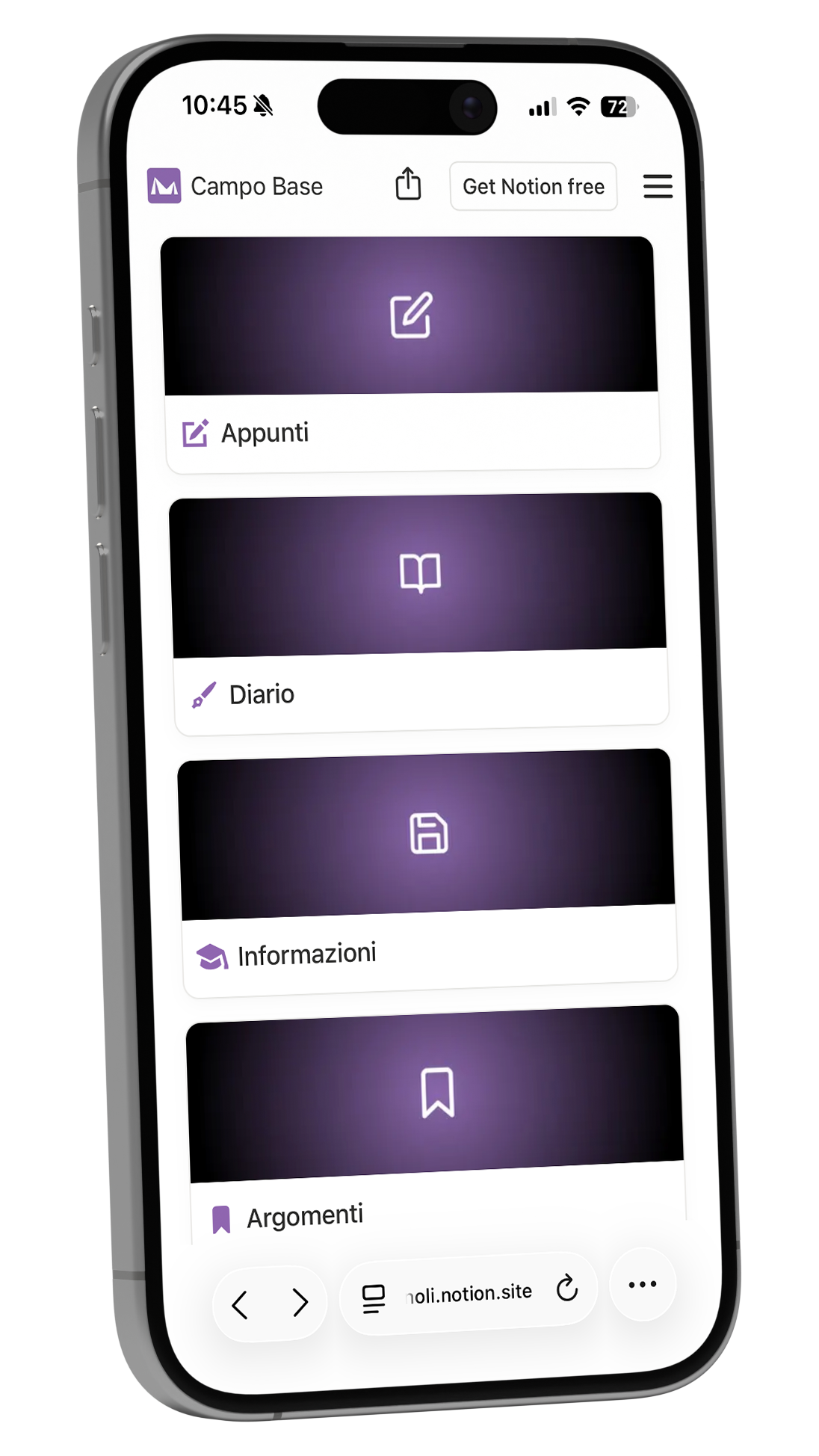
1 mobile version
Smartphone-optimized dashboard.
Works like a widget.
Add tasks and notes on the go.
I'm so glad I downloaded Campo Base for students. It's been a helpful and enriching experience, and I've never had support this motivating, practical, and useful before.
Sara Candido
Absolutely perfect. After years at university, I’ve found the ideal way to organize deadlines, materials, and schedules all in one place! Highly recommended!
Francesca Crotti
Campo Base has saved me hours of setup: it's ready to use, customizable, and I finally feel organized.
Anonymous buyer
Organize your work efficiently
Who is Campo Base for?

Freelancers and Consultants

Burned-Out Professionals

Notion Users

Make work life easier
Who Campo Base Is NOT For
Campo Base isn't for those looking for a simple task list. This system takes an initial 30-minute investment to learn, but in return saves you hours every week by streamlining how you manage your work.
It’s not for anyone unwilling to invest 30 minutes in learning
If you prefer a superficial approach and aren't willing to invest some time in learning, Campo Base isn't for you.Not for people who don’t want to improve
If you’re not interested in improving your productivity and optimizing your processes, this system won’t deliver the results you’re looking for.Not for people looking for quick fixes
Campo Base takes some initial effort to set up, so if you're looking for an instant solution, you may be disappointed.Not for people who aren’t tech-savvy
If you're not comfortable with digital tools and software, Campo Base may feel complicated.Not for people without clear goals
If you don’t have a clear vision of your goals, the system may not provide the support you need to achieve them.
an all-in-one tool
What you get
Complete Notion Template

Detailed Guide

Future Updates
Works with Notion Free
Choose your plan
Choose the plan that’s right for you.
| Light €59 | Professional €69 | AI Prompt Packs €29 each | |
|---|---|---|---|
| Who it’s for | People just starting out with productivity systems | Freelancers and professionals managing complex projects | People who want to automate with Notion AI |
| Database | 5 databases: Tasks, Projects, Contexts, Notes, Journal | 14 databases: all Light features + Archive, Topics, Finances, Clients, Opportunities, and more | Instructions Hub with categorized prompt library |
| Dashboards | 5 core dashboards + mobile version | 12 specialized dashboards + mobile version | Automatic instruction routing for every use case |
| Methods | Eisenhower Matrix, Time Blocking, Energy-Based Planning | All Light features + Bottleneck Analysis, Time Tracking, 80/20 Rule | Prompt templates for analysis, content, email, and automation |
| Key features | Task management, calendar, daily routines | Everything in Light + Client Management, Finances, Time Tracking, Strategic Reviews | Ready-to-use prompt packs for copywriting, data analysis, email, social media, and automation |
| Updates | Included | Included | Included |
| Availability | Available instantly | Available instantly | Available instantly |
Light
Essential system for managing tasks, projects, and personal life
Includes:
- 4 integrated databases (Tasks, Projects, Notes, Information Archive)
- Specialized dashboards + mobile version optimized for iPhone
- Automated Eisenhower Matrix
- Time blocking and energy-based planning
- Calendar, routine templates, and structured journal
- Time tracking and bottleneck analysis
- Detailed built-in guide
Ideal for: anyone who wants to organize work and personal life in one structured productivity system, without unnecessary complexity.
€ 59
Available instantly
Professional
For those who also want to keep track of their customers and finances
Includes everything from Light, plus:
- 14 total databases (Finance, Customers, Opportunities, Bottlenecks, and more)
- 12 specialized panels
- Time tracking for contexts
- Project bottleneck analysis
- Customer and finance management
- 80/20 Rule and Strategic Reviews
Ideal for: Freelancers and professionals who manage complex projects and want total control.
€ 69
Available instantly
AI Instructions
Complete instruction library for Notion AI
Includes:
- Hub Instructions with automatic routing
- 40 ready-to-use prompt templates
- Categories: data analysis, copywriting, email, social media, automation
Practical examples:
- Daily Organizer
- Copywriter LinkedIn
- Data Analyst
- Email Systemizer
- Social comment management
- Video script creation
Ideal for: those who already use Notion and want to automate with AI without starting from scratch.
Note: works with any Notion workspace, even without BaseCamp.
€ 29 each
Available instantly, also included in the
6 AI Pack Bundle
Frequently Asked Questions
Find answers to the most common questions about our templates and services here.
Do I have to build everything from scratch?
No. Duplicate the template and get started right away. Sample records are already there to show you how it works; then delete them and add your own.Can I customize it?
Completely customizable. It’s your workspace. Edit, delete, add whatever you like.Do I need a paid Notion plan?
No. It also works with the free plan.How do I get the template?
After your purchase, you'll receive a link to duplicate Campo Base in your Notion workspace.Is support available?
For questions, email hello@andreabrugnoli.it
See how it works
Once you purchase your template, you can start using it right away with no hassle.“
And if you have any questions, you can always ask me for help. The price also includes all the video tutorials you need to become a productivity pro!